

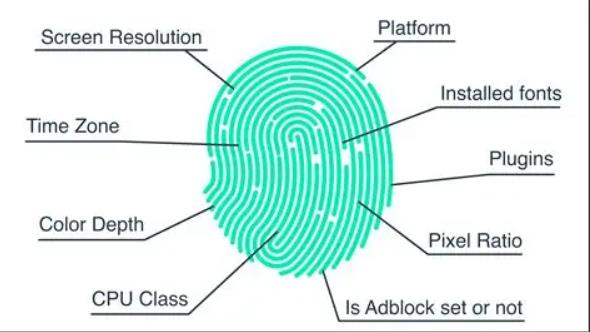

In today’s privacy-conscious digital world, most internet users understand concepts like cookies, IP addresses, and tracking pixels. But far fewer people are familiar with one of the most powerful tracking technologies on the web: browser fingerprinting.
Unlike cookies, browser fingerprints are difficult to block, hard to reset, and often invisible to the user. Even with incognito mode and VPNs, your browser can still be uniquely identified based on dozens of technical characteristics.
In this in-depth guide, you will learn:
- What browser fingerprinting really is
- How it works behind the scenes
- What data your browser leaks
- How advertisers and websites use fingerprints
- How to check your own fingerprint with online tools
- How to reduce fingerprint tracking and protect your privacy
This guide is written for general users, website owners, marketers, and privacy-conscious individuals across the US and Europe.
What Is Browser Fingerprinting?
Browser fingerprinting is a tracking technique that identifies users based on the unique configuration of their web browser, device, and operating system.
Instead of storing data on your computer like cookies do, fingerprinting works by collecting information your browser already exposes and combining it into a unique digital signature.
This digital signature — your “fingerprint” — can often uniquely identify you among millions of users.
Simple Definition
A browser fingerprint is a unique profile created from your device’s technical settings, allowing websites to recognize you without using cookies.
How Browser Fingerprinting Works
Every time you visit a website, your browser automatically sends technical information so the site can display correctly. Fingerprinting scripts collect this information silently and combine it into an ID.
Common Data Points Used in Fingerprinting
A single fingerprint may include:
- Operating system (Windows, macOS, Linux, iOS, Android)
- Browser type and version
- Screen resolution and color depth
- Installed fonts
- Time zone and language
- GPU and graphics driver
- Audio processing profile
- WebGL and Canvas rendering
- Touch support
- CPU architecture
- Battery API (on some devices)
Individually, these values are not unique. But when combined, they create a highly distinctive identity.
Why It’s So Effective
Studies from the Electronic Frontier Foundation (EFF) show that most browsers are uniquely identifiable based on fingerprint data alone — even among millions of users.
Unlike cookies:
- Fingerprints are harder to delete
- They persist across sessions
- They usually survive private browsing modes
- They work even with ad blockers
Browser Fingerprinting vs Cookies
Many people assume clearing cookies fully protects their privacy. Unfortunately, that’s no longer true.
| Feature | Cookies | Browser Fingerprinting |
|---|---|---|
| Stored on device | Yes | No |
| User can delete | Yes | No |
| Requires user consent | Often | Usually not |
| Affected by Incognito | Yes | Usually no |
| Affected by VPN | Sometimes | Rarely |
| Regulatory visibility | High | Low |
Fingerprinting operates mostly outside traditional privacy controls.
What Information Does Your Browser Fingerprint Reveal?
Your fingerprint does not directly reveal your name, email, or exact address. However, it often exposes:
- Your device type and model class
- Your operating system and version
- Your browser build and rendering engine
- Your approximate geographic region
- Your hardware performance tier
- Your preferred language
- Your installed font library
- Your GPU model category
In combination with other tracking methods (accounts, IP logs, analytics), a fingerprint can easily become personally identifiable.
How Advertisers and Websites Use Fingerprinting
Browser fingerprinting is widely used across multiple industries.
1. Advertising and Attribution
- Cross-device tracking
- Fraud prevention
- Ad frequency control
- Retargeting without cookies
With third-party cookies being phased out (Chrome, Safari, Firefox), fingerprinting is becoming an alternative for many ad platforms.
2. Fraud Detection and Security
Banks and e-commerce platforms use fingerprints to:
- Detect account takeovers
- Identify bot traffic
- Prevent payment fraud
- Stop credential stuffing attacks
3. Anti-Bot Protection
Companies like Cloudflare and Akamai use fingerprinting techniques to distinguish:
- Human users
- Automated scraping bots
- Malicious attack tools
4. Paywall and Price Discrimination
Some websites use fingerprints to:
- Enforce article limits
- Detect VPN or proxy abuse
- Adjust pricing based on repeated access
Is Browser Fingerprinting Legal?
This depends heavily on jurisdiction.
United States
- Generally legal
- Considered part of website analytics and security
- No explicit federal ban
- Subject to FTC deception and unfair practice rules
European Union (GDPR & ePrivacy)
Under GDPR, fingerprinting is considered personal data processing if it can identify a user.
This means:
- Websites must disclose fingerprint use
- In many cases, they must obtain user consent
- Users have rights to access and deletion
However, enforcement remains inconsistent.
How Unique Is Your Browser Fingerprint?
Your fingerprint uniqueness depends on:
- Your operating system
- Browser popularity
- Installed software
- Hardware configuration
- Privacy protection tools
Ironically, privacy tools can make you more unique if very few users share the exact same configuration.
For example:
- A default Chrome user on Windows is often not very unique.
- A Firefox user with aggressive privacy hardening may be highly unique.
This is called the fingerprinting paradox.
How to View Your Browser Fingerprint Online
You can easily inspect your own fingerprint using free online tools. These tools simulate the perspective of tracking scripts.
Below are the most reliable public tools (no downloads required):
1. AmIUnique
Displays:
- Fingerprint uniqueness score
- Browser entropy
- Canvas, WebGL, audio fingerprint
- Font detection
- Trackability analysis
Used commonly by privacy researchers.
BrowserLeaks
Provides:
- IP address details
- WebRTC leaks
- DNS resolution
- Screen and hardware data
- JavaScript object profiling
- Media device enumeration
Cover Your Tracks (by EFF)
Developed by the Electronic Frontier Foundation:
- Shows how well your browser resists fingerprinting
- Tests tracking protection
- Evaluates ad-blocker effectiveness
- Calculates uniqueness
FingerprintJS Demo
Demonstrates:
- Real-time fingerprint generation
- Stability across sessions
- Device recognition accuracy
Step-by-Step: How to Check Your Fingerprint
You can follow these steps on any modern browser:
- Open a fingerprint test website
- Allow the page to finish scanning
- Review the detected values:
- User agent
- Screen resolution
- Canvas fingerprint
- WebGL info
- Audio context
- Installed fonts
- Refresh the page
- Open an incognito window and test again
- Switch VPN locations and test again
You’ll notice that:
- Cookies change easily
- Fingerprint often stays very consistent
- VPN affects IP but not most fingerprint metrics
Does Incognito Mode Hide Your Fingerprint?
Short answer: No.
Private browsing only:
- Prevents local cookie storage
- Blocks history recording
- Clears session data on close
It does not:
- Hide your GPU
- Hide your screen size
- Hide your WebGL profile
- Hide your audio fingerprint
- Hide your installed fonts
Your fingerprint remains mostly identical.
Does a VPN Hide Your Fingerprint?
A VPN only changes your network identity, not your device identity.
VPN changes:
- Public IP address
- Approximate location
- ISP identification
VPN does NOT change:
- Browser version
- OS architecture
- Canvas rendering
- Audio stack
- Hardware graphics output
VPN + fingerprint = still highly trackable.
How Stable Are Browser Fingerprints?
Fingerprint stability depends on:
- Software updates
- Hardware changes
- Browser changes
- Installed plugins
Highly Stable
- GPU
- CPU architecture
- Screen resolution
- Font libraries
Semi-Stable
- User agent
- Audio context
- WebGL vendor
Unstable
- Battery API
- Some experimental browser flags
Most high-quality fingerprinting systems can identify users with over 95% consistency across sessions.
How Fingerprinting Affects Privacy
Browser fingerprinting creates several privacy risks:
- Silent surveillance without consent
- Cross-site tracking
- Invisible behavioral profiling
- Long-term user identification
- Difficulty of opting out
- Regulatory transparency problems
Unlike cookies, users have little visibility and control over fingerprint collection.
How Fingerprinting Impacts Digital Advertising
With third-party cookies being deprecated:
- Chrome is phasing them out
- Safari and Firefox already block them
- Mobile app tracking requires consent
Advertisers are increasingly exploring fingerprint-based tracking, especially for:
- Ad fraud prevention
- User deduplication
- Attribution modeling
- Retargeting fallback systems
However, regulators are closely monitoring these practices.
For website publishers using AdSense, AdX, or header bidding, fingerprinting may be involved at multiple layers of the ad stack without direct publisher control.
Can Browser Fingerprinting Be Blocked?
There is no perfect solution, but you can reduce its effectiveness.
1. Use Privacy-Focused Browsers
- Brave
- Firefox (with Enhanced Tracking Protection)
- Tor Browser
Tor Browser offers the strongest anti-fingerprinting method by making all users look identical.
2. Enable Built-in Anti-Fingerprinting
In Firefox:
- about:config → privacy.resistFingerprinting = true
This forces standardized values across multiple features.
3. Install Anti-Fingerprinting Extensions
Popular options include:
- Canvas Blocker
- BrowserMask
- Trace
- Privacy Badger
Note: Some extensions can unintentionally increase uniqueness.
4. Use Standard Screen Resolution
Unusual aspect ratios increase uniqueness.
5. Avoid Excessive Font Installations
Large font libraries are extremely identifying.
6. Disable WebRTC
Prevents IP leakage and device enumeration.
The Trade-Off: Privacy vs Usability
Anti-fingerprinting techniques often cause:
- Website layout bugs
- Login issues
- Payment verification problems
- CAPTCHA loops
- Streaming platform blocks
High-security settings may reduce convenience.
For most users, the best balance is:
- Privacy-focused browser
- Moderate fingerprint resistance
- Well-configured ad blocker
- Trusted VPN
Special Cases: Mobile vs Desktop Fingerprinting
Mobile Fingerprinting
Typically includes:
- Device model
- OS version
- Touch hardware
- Sensors data
- Battery metrics
Mobile browsers are often more uniform, reducing uniqueness slightly — but mobile apps can fingerprint even more aggressively.
Desktop Fingerprinting
Desktop browsers reveal:
- GPU model
- Monitor resolution
- Multi-screen configuration
- Installed local fonts
- Microphone and camera devices
Desktop fingerprints are often more unique.
Fingerprinting and Account Logins
Many platforms combine:
- Cookies
- IP address
- Browser fingerprint
- Behavioral patterns
To build a highly persistent identity.
This is why you may still see:
- Security alerts
- Account lockouts
- Device recognition prompts
Even after clearing cookies.
Fingerprinting in Cybersecurity and Fraud Prevention
While fingerprinting raises privacy concerns, it plays a major security role in:
- Online banking
- Cryptocurrency exchanges
- E-commerce checkouts
- SaaS platforms
- Cloud services
It helps stop:
- Credential-stuffing attacks
- Automated card testing
- Account hijacking
- Fake registrations
- Click fraud
For many services, fingerprinting is now critical infrastructure.
How Accurate Is Browser Fingerprinting?
Modern fingerprinting engines can:
- Distinguish users among millions
- Detect returning users without cookies
- Survive VPN switches
- Identify users across browser sessions
Accuracy can exceed 99% in controlled environments, slightly lower in public internet conditions.
Common Myths About Browser Fingerprinting
Myth 1: Clearing cookies removes fingerprint tracking
❌ False.
Myth 2: Using Incognito mode prevents fingerprinting
❌ False.
Myth 3: VPNs fully protect you
❌ False.
Myth 4: Only shady websites use fingerprinting
❌ False — many banks and major retailers use it.
Myth 5: You can completely eliminate fingerprinting
❌ Nearly impossible without Tor.
How Website Owners Use Fingerprinting
Many legitimate website owners use fingerprinting to:
- Detect duplicate signups
- Prevent free-trial abuse
- Stop comment spam
- Identify returning customers
- Protect intellectual property
However, improper use without transparency can violate privacy laws in some regions.
Fingerprinting and GDPR Compliance
Under GDPR, if fingerprint data can identify a person:
- It becomes personal data
- Requires a lawful basis for processing
- Must be disclosed in privacy policy
- May require consent depending on purpose
- Users can request access and deletion
Non-compliance can lead to heavy fines.
Should You Be Worried About Your Fingerprint?
For most everyday users:
- Fingerprinting is mainly used for ads and security
- It rarely leads to direct personal harm by itself
- Combined with data breaches, it increases risk
High-risk individuals (journalists, activists, researchers) should take stronger precautions.
Best Practices for Protecting Your Browser Fingerprint
If you want a practical privacy balance:
- Use Brave or hardened Firefox
- Keep browser and OS updated
- Disable unnecessary plugins
- Use a reputable VPN (for IP privacy)
- Enable Do Not Track (limited effect)
- Regularly test your fingerprint online
Future of Browser Fingerprinting
The industry is moving toward:
- More privacy regulation
- Less user-specific tracking
- Privacy Sandbox technologies
- Server-side fraud detection
- Behavioral pattern analysis
At the same time, fingerprinting techniques are becoming:
- More advanced
- More subtle
- Harder to detect
- Less dependent on JavaScript alone
It will remain a core part of the web security and advertising ecosystem.
Frequently Asked Questions (FAQ)
Is browser fingerprinting illegal?
No, but its use is regulated in many regions, especially the EU.
Can websites see my exact hardware model?
They typically see GPU class and rendering signatures, not full serial numbers.
Can I change my fingerprint manually?
Yes, with specialized browsers or extensions, but it often reduces compatibility.
Does resetting my computer change my fingerprint?
Partially. Hardware-based elements often remain unchanged.
Is fingerprinting used on mobile apps?
Yes — often more aggressively than on browsers.
Understanding and Managing Your Browser Fingerprint
Browser fingerprinting is one of the most powerful and least understood tracking technologies on the modern internet. Unlike cookies, fingerprints are invisible, persistent, and difficult to control.
They play a dual role:
- Protecting users from fraud, bots, and abuse
- Tracking users for advertising, analytics, and profiling
Every internet user should understand:
- What information their browser leaks
- How fingerprinting works
- How to test their own fingerprint
- How to reduce unnecessary exposure
By using privacy-focused browsers, regularly testing your fingerprint online, and maintaining reasonable security practices, you can significantly improve your digital privacy without sacrificing usability.